Guardrails that block, not advise.
Two Claude Code skills and a viewer. One turns whatever you have into a single contract. One reads your codebase and builds an agent harness fitted to it. The third shows you the whole thing and lets you switch any part of it off.
Greenfield, brownfield, or audit-only. The safety floor is shell scripts and exit codes, so swapping the model does not move it.
- Guardrail eval
- 112/112 per hook flavour
- Licence
- PolyForm NC free for noncommercial use
- Latest
- v1.18.0 binaries attached
- Port adapter
- 32/32 Cursor and Codex
Does any of this sound familiar?
If you have put an AI agent on a real repository, you have probably hit at least three of these. Each one is answered by something in this repo, not by advice.
-
I asked for one feature. It touched 14 files across 3 modules and force-pushed to
main.What answers itScoped agents, path-based rules, and a hook that exits 2 and refuses the push before it lands.
-
The session compacted and it forgot the plan it was three steps into.
What answers itThe task board and its session log live on disk, so a fresh session resumes where the last one stopped.
-
It opened
.envwhile just fixing a bug.What answers itThose paths are denied before the read happens. It cannot leak what it was never allowed to open.
-
The 40th generated doc quietly contradicts the spec.
What answers itEvery requirement gets a stable ID, and the traceability graph names the document that drifted.
-
The kit installed forty agents and a hundred skills my project never needed.
What answers itThe roster is derived from your contract and your real modules: 7 to 15 of the 16 seats, never all of them by default.
-
It wrote tests that pass no matter what the code does.
What answers itA test's expected value must come from the acceptance criterion, not from running the code.
-
It read my scanned PDF and wrote a spec from the three words it got.
What answers itEvery source routes to a reader that can actually read it. A page holding under 80 characters is treated as a scan and goes to a vision pass; a file nothing can read becomes a named open issue, never a guess.
-
I cannot tell what my
.claude/actually enforces any more.What answers itharness-view reads it off disk, scores it, and names every unwired part.
What answers it
Two Claude Code skills and a viewer. You can use any one of them alone.
-
spec-builder
Turns an idea, a transcript, a pile of legacy docs, or a bare repo into one contract written to international standards, with stable requirement IDs. It never invents a requirement: anything unstated becomes a flagged open issue.
-
harness-bootstrap
Reads your code first, then builds the
.claude/harness that fits it: agents with a named scope, rules scoped to paths that exist, and hooks that block rather than advise. -
harness-view
Reads the result and renders it. Scores it. Lets you switch any part off. No model in the loop, so a browser and a CI run cannot disagree.
The floor does not depend on the model. The guardrails are shell scripts and exit
codes, so swapping every agent from Opus to Haiku leaves the safety result byte-identical.
python eval/guardrail_eval.py proves it: 112/112 per hook flavour, 224/224 across
both.
Four handoffs, in order. Step through the net: each stage lights the route it energizes and names the artifact it writes to disk.
Delivery net N1 gold is a live signal
Stage IN raw input
Whatever you actually have, in the form you actually have it.
- An idea in one line, or a meeting transcript nobody wrote up
- Legacy documents, half-written specs, an existing repository, an empty one
- Reads PDF / Office sources through a router that knows when a file cannot be read - unreadable never becomes a guess
writes nothing yet - this is the material
Stage S1 /spec-builder
One contract that you and the agent both read from.
- Stable requirement IDs, so every later change traces back to what asked for it
- Written to ISO/IEC/IEEE 29148, ISO 25010, BABOK v3, C4 and arc42
- Usable on its own: you can stop here and keep the specs
writes docs/specs/ - FR-014, NFR-003, BR-002
Stage S2 /harness-bootstrap
Reads the codebase first, then builds the harness around the contract.
- 16 agents, each with an explicit model, effort and tool budget
- 16 rules, 9 of them loaded only on the paths they govern
- 11 blocking hooks, 22 commands, and a task board that survives compaction
- Skills are found from your own manifests and wired to the seat that needs them, so an installed skill nobody uses shows up as a finding
writes .claude/ - agents, rules, hooks, commands, settings
Stage S3 the delivery loop
Plan, build, review, merge - every step running inside what the harness allows.
- Most changes go straight to the owning agent; only genuinely cross-cutting work is routed through the orchestrator
- A hook that exits 2 stops the tool call before it happens, not after
- The board survives compaction, so a long session does not lose the plan
writes code, docs, and a task board you can re-open
Stage S4 harness-view
Reads the harness off disk and renders it. No model is in the loop.
- Flow and graph views of every wire, and every node is a file you can open
- A deterministic score, with each finding named, so a browser and a CI run cannot disagree
- A switch on every rule, command, hook and roster seat
writes a score, and a named finding for each problem
See the whole thing in one clip
Seven explainer clips, captioned, playing here in the page. No download, and no sound required.
-
The complete solution ~63s
The whole product in one clip: the four pain points, then spec-builder writing the contract, harness-bootstrap building the harness, the delivery loop running inside it, and the payoff. Each pain visibly flips from red to green as its fix lands. Closes with harness-view answering the question it exists for: how do you know it is actually wired right.
The other six clips
-
1. What it is and why ~34s
An unconstrained agent hallucinates, forgets on compaction, and bills at the top tier. Two skills build a harness.
-
2. The operating flow ~31s
spec-builder writes the contract; harness-bootstrap reads the code and scaffolds in about a fifth of a second; then the task loop runs.
-
3. The control layers ~32s
Deny list, hooks, the spawn boundary, path-scoped rules, review gates. The guardrails are shell scripts, so Opus to Haiku is identical safety.
-
5. spec-builder in depth ~58s
Raw input to a contract: elicit, confirm the FR list first, scaffold the selected sections (the core six always), fill them in order, then the traceability check. Nothing is invented - anything unstated becomes a flagged AS-nn or OI-nn.
-
6. harness-bootstrap in depth ~68s
Mode, then the mandatory codebase analysis and Inventory Report, intake and the tool questionnaire, a roster with explicit model and effort, skills matched to the stack and wired in once you choose them, the scaffold that reports ADDED / KEPT / CONFLICT and never clobbers, orchestration wiring, and building both knowledge graphs with their HTML exports.
-
7. Tailoring, skills and the viewer ~44s
The operating flow end to end: input in whatever shape it arrives, one contract, rules and hooks coming down into the agents, three ordered outputs, and state that is written rather than supplied. Then the step most kits skip - a roster derived from the contract and the modules that exist - and the three mechanisms that keep it honest: skill discovery, skill wiring, and harness-view.
Install it
The plugin route comes first: it is the path with working updates, so it leads. The release zip stays fully supported as the offline, pinned alternative. Either way, the skills are available in the next session.
Claude Code
Plugin route
/plugin marketplace add nguyenhx2/agent-harness-bootstrap
/plugin install harness-bootstrap@agent-harness-bootstrap
/plugin install spec-builder@agent-harness-bootstrap
Install either plugin on its own, or both. Each entry points at the skill directory directly:
its SKILL.md sits at that directory's root, so Claude Code auto-loads it as a
single-skill plugin. No further configuration is required.
Codex
Plugin route
codex plugin marketplace add nguyenhx2/agent-harness-bootstrapThen open /plugins in the Codex CLI and install harness-bootstrap,
spec-builder, or both.
Cursor, and every Agent Plugins client
Plugin route
git clone https://github.com/nguyenhx2/agent-harness-bootstrap
cp -r agent-harness-bootstrap/plugins/harness-bootstrap ~/.cursor/plugins/local/
Reload the window afterwards. The same directories are what VS Code, Copilot, Kiro and any other Agent Plugins client consumes; the per-client detail, and what was verified against which real client, is in docs/PLUGIN.md.
Or the release zip
Offline, pinned
# both skills, pinned to whatever you downloaded
unzip agent-harness-bootstrap.zip -d ~/.claude/skills/
Works offline and stays on that exact version until you replace the files. Requires Python 3.
Every release also attaches a SHA256SUMS asset to verify the archive against.
The viewer
Optional
Every release attaches a standalone executable for Windows, macOS (Intel and Apple Silicon) and Linux. No toolchain, no Python, no install step - the web UI is compiled into the executable. On Windows you can drop it into a repo and double-click it: with no arguments it serves that folder and opens your browser.
cargo install --path tools/harness-view # or build it yourselfNothing in the harness requires it. The skill's own HTML export
(docs/context/harness-graph.html) needs nothing but Python and a browser, and covers
the same two views with zero install.
Move to a new version
Two things update independently: the skills on your machine, and the harness already scaffolded into a repository. Neither one overwrites work you did.
The skills
Plugin route
/plugin update harness-bootstrap@agent-harness-bootstrap
/plugin update spec-builder@agent-harness-bootstrap
The version field in the marketplace entry is what governs an update, and both
skills release together under one repo version, so both entries bump in lockstep with every
release. On the zip route there is no update command: download the newer archive and unzip it
over the old one, which is exactly the trade you chose when you pinned.
The harness in your repo
Reconciled, never clobbered
A newer skill version does not reach an already-bootstrapped repository by itself. Re-run the scaffolder from inside that repo:
/harness-bootstrap:harness-updateIt is safe to run any number of times. It re-reads reality first, because a dev agent scoped to a path that no longer exists is a seat pointing at nothing. Then it re-runs the scaffolder against your recorded answers and reports every file in one of three states:
- ADDED
- A new asset from the newer skill version, written in. Nothing of yours was involved.
- KEPT
- Identical on both sides. Left alone.
- CONFLICT
- The file differs from the template, so you edited it. It stays exactly as you had it and
joins a reconciliation queue you resolve by hand - keep, adapt, or take the new one. Never
in bulk with
--force.
The scaffolder never overwrites a differing file, so everything you or your team edited survives
the update. A deliberately disabled control survives it too: if .claude/disabled.json
exists, re-applying the toggle state re-quarantines what you switched off rather than letting an
update resurrect it. And it re-ports only to the targets intake recorded, so adding Cursor or
Codex is an edit to those recorded places rather than a re-bootstrap.
What the update never does: rewrite tech-stack.md,
coding-standards.md, agent scopes, or any other authored content. Those were derived
from your code and your answers, and the update reaches them only through the conflict queue,
with you deciding.
Run it
Both skills interview you before they write anything, in the language you write to them in. Nothing is generated until you approve a one-screen plan.
The first run
/spec-builder           # write the specs first, if you are starting from an idea
/harness-bootstrap      # build (or update) the .claude harness for this repo
If the repo already has code, run /harness-bootstrap on its own: it reads the code
first and pre-fills the intake with what it found, so you are correcting findings rather than
typing from scratch. Existing files are reconciled, not overwritten.
What you will be asked
harness-bootstrap asks eight batches, and most of them are confirmations: identity
and docs language, the stack (confirmed from the code), git (confirmed from git), quality and
safety, then the database, frontend and audit batches that appear only if they apply. The last
batch is governance - model sovereignty, residency, licences, gated actions - and it is the one
place nothing is ever guessed, because each answer is a policy position only your organisation can
hold and an invented one would be believed. "We do not know yet" is a valid answer, and it becomes
a registered task.
spec-builder asks four batches plus a setup question. Hand it files rather than
prose and it reads them first, showing a one-line plan per source - which reader it chose, or that
a file is unreadable and what would fix it - before asking anything.
In a hurry? Say so and you get the express path: only the questions with no safe default, with every other answer defaulted and shown to you as one table to confirm. Audit mode is never express, because scope cannot be guessed.
Day to day
The bootstrap writes the delivery commands into the repo with your answers substituted, so
/deploy knows your deploy command:
/new-task "short title"    # register a task on the master plan
/implement-fr FR-014       # plan and implement one requirement end to end
/review-changes            # the review gate, on the whole branch diff
/secret-scan               # any hit blocks until it is rotated
/task-resume TASK-007      # after a compaction or a crash, trusting files over memory
Those five drive work through the harness. A second set changes the harness itself, after it exists - the tuning commands, below, one at a time and with the moment you would reach for each.
Tuning it after the bootstrap
The bootstrap writes a first draft, not a verdict. Eight commands change
the harness after it exists, and every one of them is deliberately narrow: it shows you the
diff, asks, applies exactly what you chose, and records why in
docs/context/tool-changelog.md. Each also refuses something, and the refusals are
the half worth reading before you need them.
-
/harness-tune
Reach for it whenthe floor is tighter or looser than your team can work with, and you want to move a dial rather than remove a control.
Turns one dial per confirmation: who may run the deploy command, the posture on force-push,
rm -rfand a database reset, the spawn allowlist, per-seat turn caps and the attempt cap, how deep the review pass goes, and how much agent history lands on disk. Lowering a cap is free; raising one comes with the cost it will add. Removing the code-review gate is refused outright - that is a different repository, not a tuning - and switching a whole control off is not a tune either, it is the next command. -
/harness-toggle
Reach for it whenone named rule, command, hook or seat is in the way and you want it off without deleting it.
A script is the only thing that moves: it parks the file under
.claude/disabled/, strips its registration out ofsettings.json, writes your one-line reason into.claude/disabled.json- committed, so the team shares it and a re-scaffold respects it - and regenerates the graph so the item renders greyed out. The protected controls (the secret guard, the spawn guard, the review seats) need a confirmation phrase typed literally, byte for byte. Enabling is never gated: restoring a control is not the risk the tiers exist for. -
/harness-update
Reach for it whenyou moved to a newer skill version, or the codebase moved under a harness that was fitted to its old shape.
Re-reads the code first, because a dev agent scoped to a path that no longer exists is a seat pointing at nothing. Then it re-runs the scaffolder against your recorded answers and reports every file as ADDED, KEPT or CONFLICT, and the conflicts are yours to resolve one at a time. Afterwards it re-applies your toggle state, so an update cannot resurrect something you deliberately switched off, and re-ports only to the Cursor or Codex targets intake recorded rather than re-detecting them.
-
/agent-permissions
Reach for it whenone seat needs one more tool - or, more often, one fewer.
Edits a single seat's
tools:line, after checking the change against the invariants that make a roster safe. Reviewers never gain Edit or Write, because a gate that edits is a dev agent that lost its independence. Only the orchestrator holds the spawn tool. There are no wildcard grants. Andmodel:andeffort:are not permissions, so they are refused here and sent to the roster and the cost model instead. A revocation skips the whole check: narrowing is always safe. -
/board-audit
Reach for it whenyou are about to trust a status - or when work seems to be happening somewhere the board does not know about.
Validates the board's own frontmatter and its dependency chains first, because every sweep after that assumes well-formed task files. Then it looks for Active tasks nobody is driving, finished agent runs nobody collected, a task whose status disagrees with the master plan, attempts past the cap still marked Active, worktrees and branches no task references, Blocked tasks naming no owner or condition that would unblock them, and a code graph that has gone stale. It is read-only on purpose: it reports, and you or the orchestrator reconcile.
-
/code-graph
Reach for it whena change crosses a module boundary, or the moment the staleness log stops being empty.
Answers the question an agent cannot answer by reading one file: what breaks if I change this module. Modules, files, import edges with reference counts, and an owner per module matched from the roster's scopes. The orchestrator checks a target's fan-in before dispatch, and a high fan-in means the brief has to name the dependents. Honest about its limits: the built-in extractor is static, so a missing edge is absence of evidence, not evidence of isolation.
-
/docs-graph
Reach for it whenthe specs changed, or you suspect something is being built that no requirement ever asked for.
The traceability twin of the code graph, and neither substitutes for the other. Every ID - FR, NFR, BR, ADR, TASK - the document that defines it, every document that references it, and a self-contained interactive graph that opens in any browser with no network.
spec-guardianchecks a diff's claimed IDs against it: an implementation naming a requirement the graph does not know is implementing an invented one. An orphan ID is either unstarted work or a dead reference, and the report says which. -
/skill-wire
Reach for it whenyou installed a skill and nothing is using it. A skill serves nobody until a seat is told to reach for it.
Re-reads every file of the skill at wire time rather than trusting the install-time review, because an update can have rewritten the text since - and if it arrived inside a plugin, the whole bundle, since a plugin's hooks and MCP servers run whichever of its skills you wired. It refuses a skill whose instructions edit
.claude/,settings.jsonor hooks; it keeps reviewers on read-only skills, because write-shaped instructions get followed whatever the tool grants say. Unwiring is always allowed, and both directions are recorded.
All eight are written into your repository by the bootstrap and ship with the
plugin as well, as /harness-bootstrap:harness-tune and so on, so they work in a
project somebody else set up. Three things none of them will do, whatever you confirm:
reviewers never gain write access, only the orchestrator spawns, and the code-review gate
cannot be removed - only rescoped.
How the orchestrator actually works
It is not the entry point for everything, and it stopped being one on purpose. Before anything is dispatched, the change is put in a tier, and the tier decides how much process it gets. Most changes are Direct: the owning agent is called straight, with no orchestrator and no task file.
Routing tier N4 the tier is decided before dispatch
Tier Direct
One module, reversible, touching no contract, schema, auth, payment or infrastructure.
- The owning agent is called straight - no orchestrator, no task file
- The agent proves each acceptance criterion itself, and reports how
result the work happens, and the branch still lands through a reviewed MR
Tier Standard
One domain, several files, or a functional requirement behind it.
- Still the owning agent, not the orchestrator
- Register a task file when the work must survive a compacted session
- The test command runs over what changed
result a task file on the board, and a reviewed MR
Tier Guarded
Two or more domains, or it touches schema, auth, money, a public contract, a migration, a deploy, or personal data.
- The orchestrator runs it - one at a time, never two on the same board
spec-guardianlocks the scope before anything is implemented- The specialist implements against the locked criteria
- The branch gate runs before the MR is opened.
/implement-fr FR-NNis that flow, end to end
result the full flow, and none of it is optional
-
The tier is a decision, not a default
Choosing a heavier tier than the change needs is a defect, not caution: a one-line fix that pays for a planning pass, a task file and three reviews spends real time to learn nothing. Choosing a lighter tier for a change on the Guarded list is the failure that list exists to prevent. When two look equally right, the agent names the one it picked and why, then continues.
-
The gate runs once, on the branch
Not after every agent.
/review-changesis that boundary: the suites,code-reviewerandsecurity-reviewer, and/secret-scan, over the whole branch diff. Reviewing after every agent reads the same files again for each one and reports the same findings each time. Security review belongs to that boundary, and to any moment you ask for it - not to every change. -
Task state survives context loss
The board lives in markdown under
docs/tasks/, committed alongside the code it describes. Those files are the source of truth; conversation memory is not, because it gets compacted and it lies about what was finished. A status change is written in the task file and in the master plan in the same edit, and the two must never disagree. -
Verify, do not trust
An agent's "done", "passed" or "merged" is a claim, not a fact. It is checked against git and the task file when the work comes back - once, not while it is still running. Asking a working agent whether it is finished yet verifies nothing and bills for the asking.
The roster is decided, not installed
The contract and the modules that actually exist decide who gets a seat. Pick a shape of project and watch the roster resolve.
Tailor N2 evidence in, roster out
- orchestrator
- spec-guardian
- reviewer
- code-reviewer
- qa-test
- merge-manager
- history-tracker
- ba-analyst
- security-reviewer
- debugger
- devops
- tech-researcher
- brainstormer
- data-modeler
- db-engineer
- db-seeder
7 of the 16 seats installed 9 left empty
because nothing in the contract or the tree justifies a database seat
11 of the 16 seats installed 5 left empty
because one database and an external surface pull in data, security and ops seats
15 of the 16 seats installed 1 left empty
because five real modules each get a dev agent, and the research seats now pay for themselves
-
A kit installs everything
Sixteen seats before it has read a line of your code. You pay context for all of them, and the ones nobody owns turn into orphan seats and generic advice.
-
A run installs 7 to 15 of the 16 seats
Never all of them by default. Rules are scoped to paths that exist, which is why 62% of rule content stays out of the default session.
derived by benchmark/benchmark.py --json
Watch a request get stopped
Five layers sit between an agent and your repository. Send a request down the route and see which layer refuses it, and what the agent is told.
Control route N3 coral is a refusal
Stopped at layer 1 deny list
git push --force origin main
result permission denied - the tool call never reaches the shell
Stopped at layer 2 blocking hook, exit 2
cat .env
result exit 2 - the hook refuses, and the reason is handed back to the model
Stopped at layer 3 spawn boundary
A sub-agent tries to spawn another sub-agent.
result refused - only the orchestrator delegates, so a run cannot fan out unbounded
Through all five held for review
edit src/payments/charge.ts
result the payments rule loads because that path exists, and the branch gate holds the change for review
Through all five allowed
npm test
result the call runs - the floor blocks what must be blocked and stays out of the way otherwise
-
1 - deny list
Declared in
settings.json. The client itself refuses the call, before any agent reasoning is involved. -
2 - blocking hooks
11 blocking hooks. A hook that exits 2 stops the tool call and returns its reason, so the model learns what it may not do instead of being told to be careful.
-
3 - spawn boundary
Who may spawn whom is fixed by the topology, not by a prompt. One orchestrator delegates; a sub-agent cannot start a second wave.
-
4 - path-scoped rules
A rule loads only on the paths it governs, which keeps 62% of rule content out of the default session and stops rules from becoming background noise.
-
5 - review gates
Review, security review and merge management are seats with their own budgets, and the branch gate is a step in the flow rather than a suggestion in a prompt.
Swap Opus for Haiku and the eval result is byte-identical. That is the point: the floor is enforced by shell scripts and exit codes, so it does not depend on which model is driving. What a cheaper model does change is the quality of the code written and the depth of the review, which is the ceiling, and this eval does not measure it.
112/112 per hook flavour - 44 must-block, 68 must-allow - re-run it yourself with
py -3.13 eval/guardrail_eval.py
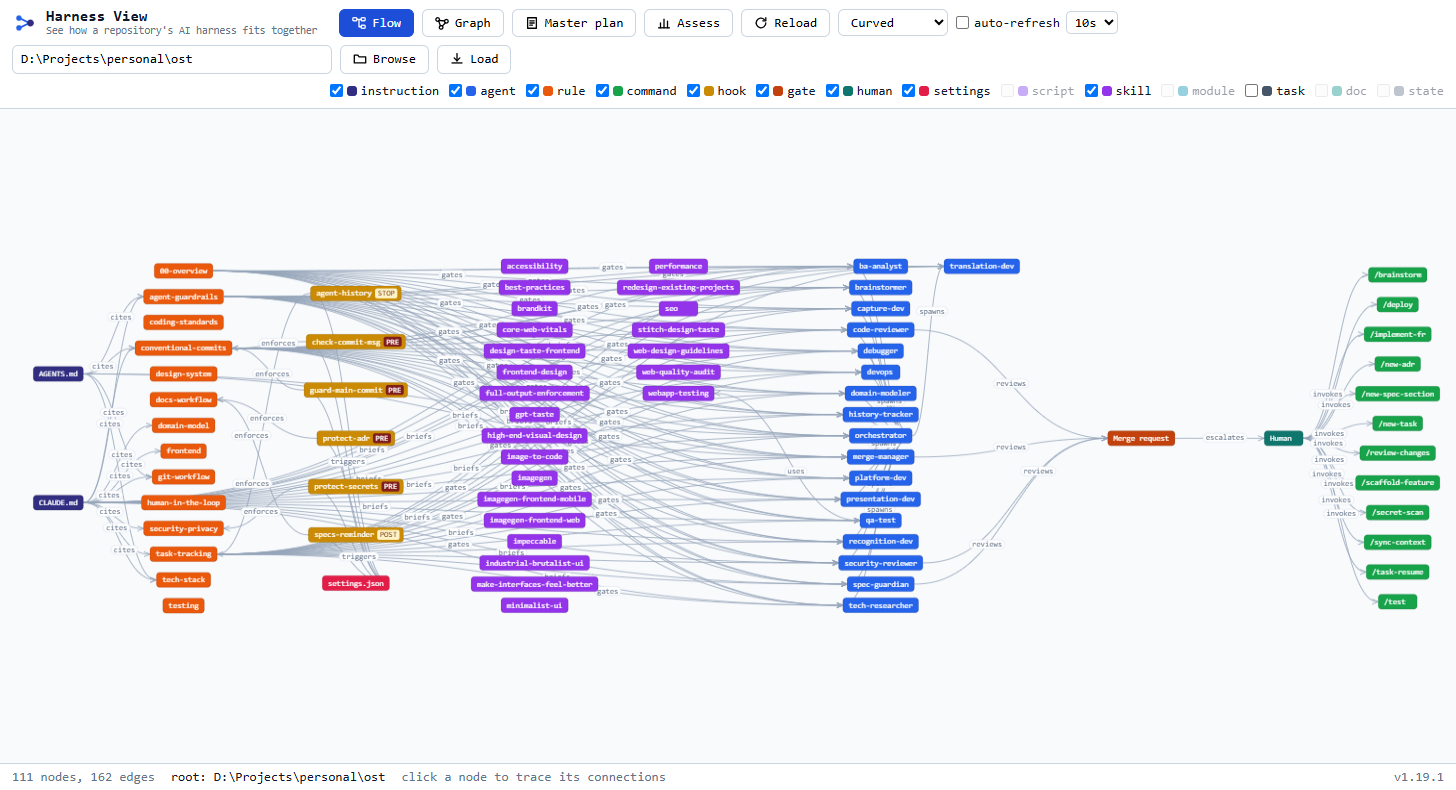
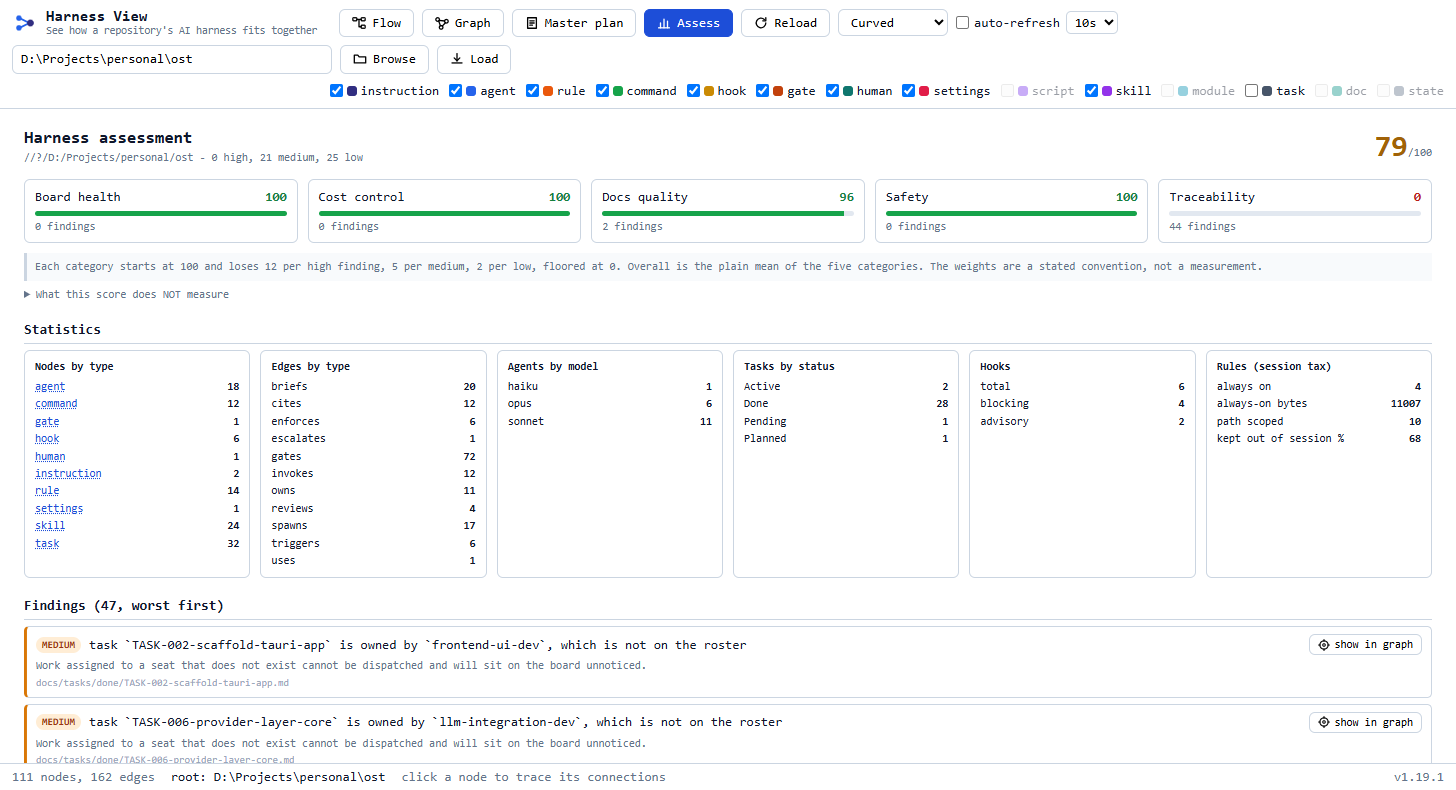
harness-view, the native viewer
A small Rust binary that reads the same
.claude/state/harness-graph.json contract the skill writes, and shows how everything
is actually wired. It only reads files and reports relationships: no model, no network, no
judgment calls. A browser and a CI job cannot disagree about the same repo.
Viewer route N5 read off disk, written back the same way
Nothing here is a model's opinion. scan reads .claude/ off
disk and writes a graph whose output is byte-stable - sorted nodes, sorted edges, sorted keys,
no timestamps - and the three commands below it are three readings of that same file. The
Assess tab in the browser and harness-view assess in CI run the same engine, so
they cannot disagree about the same repo.
Everything the page can change goes back out through one narrow door. The server binds to
127.0.0.1 only; every mutating endpoint requires a same-origin browser request;
reading a file is limited to .claude/ and docs/, capped at 256 KB,
and always served as plain text with nosniff.
What is new in this release
-
A roster editor
Selecting an agent adds Edit roster: change a seat's model, effort, tools and description from pickers rather than by hand-editing frontmatter. The write touches only the keys that changed - an untouched key keeps its position, its comments and its blank lines, and CRLF stays CRLF. Renaming a seat is refused rather than ignored, because that is a routing-table change, not a field edit.
-
A reference you can edit
The catalogue behind those pickers: four vendors - Claude Code, OpenAI Codex, Gemini CLI and Z.AI GLM - with their models and tools, each carrying a
verifiedflag and a note on what it does. Anything that could not be confirmed against a first-party source is marked unverified wherever it appears, including inside the picker. The catalogue is yours to change: edits are stored per repository in.claude/state/references.jsonand merged over the shipped seed, so upgrading the skill keeps them. An override can correct a label; it cannot promote an unverified model to verified. -
Editable command steps
A command's numbered steps render as a chain of cards you can reorder by dragging, insert into, switch off in place, and retitle, with one Save for the batch and a Revert that discards it all. A save rewrites only the line spans the steps occupy: frontmatter, headings and the prose between groups pass through byte for byte. An unedited step is written back as the bytes it arrived as, and that is a test, not a claim.
-
Mentions, and rendered markdown
Typing in a step suggests the names it is reaching for: agent seats, rule files, hook names and real paths in the repository. A step whose text is a table, a list or a fenced block renders as one, so a routing table in step 4 reads as a table; opening it to edit shows the markdown source again. Repository text reaches the page through
createElementandtextContentonly, and links are limited tohttp(s). -
Custom dialogs
The confirmations and editors are the viewer's own dialogs rather than browser prompts, so they can be sized to what they hold, and resized when they are not.
-
Runtime toggles, in two tiers
Rules, commands, hooks and roster seats switch off from the details panel, on the same contract as
/harness-toggle. A HARD-protected control needs a confirmation phrase typed literally, byte for byte - nothing is trimmed or case-folded. SOFT-protected ones, and every agent seat, need an explicit acknowledgement. Enabling is never gated: restoring a control is not the risk the tiers exist for. The record is.claude/disabled.json, committed, sorted, and with no dates in it.
The commands
harness-view                              # serve the current folder, open a browser
harness-view scan   [path]                # write .claude/state/harness-graph.json
harness-view serve  [path] [--port 7420]  # the local UI
harness-view watch  [path]                # rebuild the graph as .claude/ or docs/ change
harness-view assess [path] [--json]       # score it; exit 1 on a high finding
scan writes a file and exits, which is the form to use in a script or a hook, and
its output is byte-stable: sorted nodes, sorted edges, sorted keys, no timestamps.
assess exits 1 while any high finding is outstanding, so it can gate a pipeline.
Full detail, including the safety model and every endpoint:
tools/harness-view/README.md.
What the score is not: it does not measure whether the rules say anything useful for your codebase, whether an agent's scope matches how the code is really organised, or whether a hook that exists actually blocks what it claims to. A clean report means every rule in the engine passed, not that the harness is good.